FeatherClick

Download FeatherClick
The lag-free autoclicker made for Minecraft on Mac. One small native app, no installer, no account.
f465717510c898bde0c571afca96a0825cda7edc2df06a3b4f6b9ce47c64a11aFour quick steps.
Unzip
Open the downloaded FeatherClick-1.0-macOS.zip. Your Mac unpacks FeatherClick.app next to it.
Move it to Applications
Drag FeatherClick.app into your Applications folder. That's the whole installation: no installer and no background services.
Open it the first time
FeatherClick is free and not notarized by Apple, so macOS asks once. Open it, click Done, then go to System Settings › Privacy & Security and click Open Anyway.
Or run this once in Terminal:
Grant two permissions
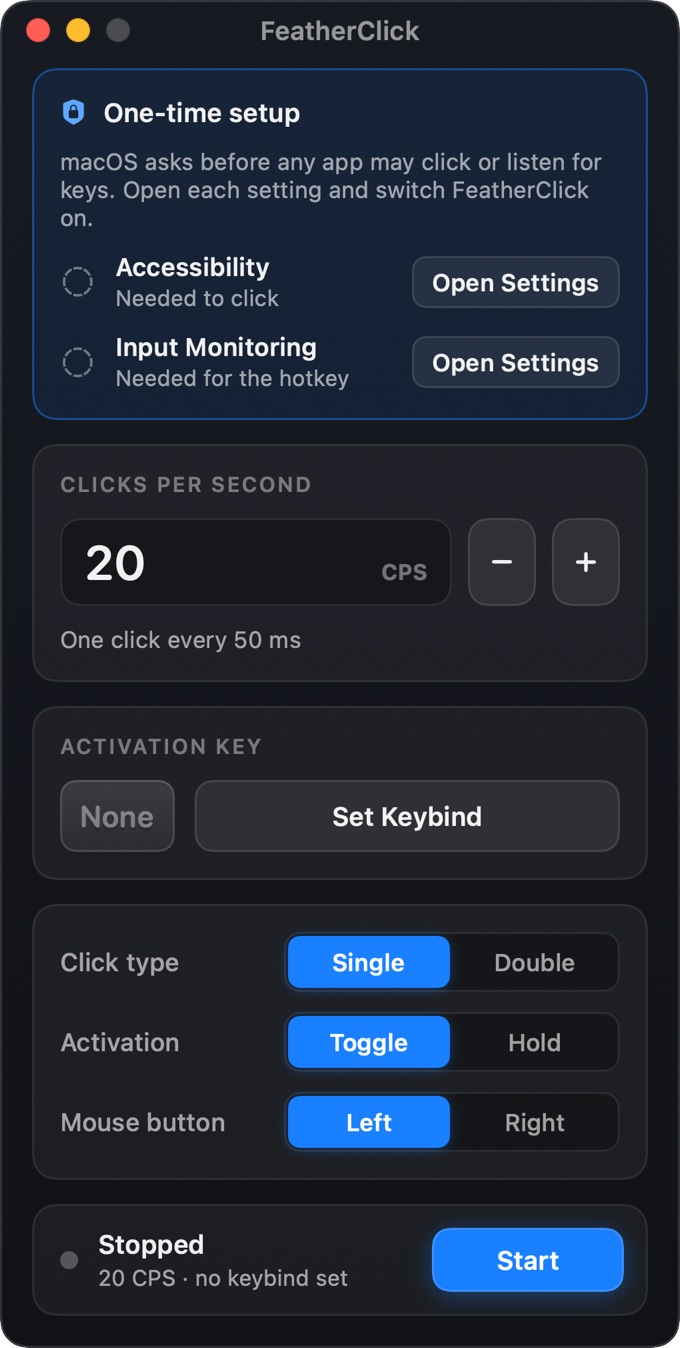
FeatherClick shows a one-time setup card. Click Open Settings for each permission and switch FeatherClick on. If macOS asks, relaunch the app.
Why macOS asks.
macOS protects you from apps that click or listen for keys without your consent. FeatherClick asks only for what it needs, and it has no network access at all.
Accessibility
Lets FeatherClick send the mouse clicks. Without it, macOS silently drops them.
Input Monitoring
Lets your activation key work while Minecraft or any other app is in front. FeatherClick only looks for your one key.
Set it once. Play forever.
Choose your CPS
Type a number (20 is the default) or use − / +. 10–14 feels natural for PvP; 20 is a good all-rounder.
Set Keybind
Click Set Keybind and press a key, such as 2, R or F6. Pick Toggle or Hold, Single or Double, Left or Right.
Play
Switch to Minecraft and press your key. Clicks start instantly at your cursor. The window can stay minimized.
Questions, answered.
Is FeatherClick really free?
Yes. No ads, no accounts, no trials and no tracking. It doesn't even use the internet.
Is it safe?
It's a ~400 KB native Swift app with no network code, no background services and no installer. It only uses the two macOS permissions it asks for, and you can revoke them anytime in System Settings.
How is the timing calculated?
From your CPS alone: interval = 1000 ÷ CPS. 20 CPS is one click every 50 ms, 15 CPS every 66.67 ms. Clicks are scheduled on a fixed timeline, so they never drift, and nothing adds a hidden delay. You can choose 0.1 to 100 CPS.
What does Double click do to my CPS?
CPS always counts physical clicks. At 20 CPS, Double mode sends 10 proper double-click pairs per second (click count 1 then 2), with the two clicks 25 ms apart.
Toggle or Hold — what's the difference?
Toggle: press your key once to start, press it again to stop. Hold: it clicks only while you hold the key down. Key auto-repeat never flips it on and off, and stopping always releases the mouse button immediately.
Which Macs are supported?
macOS 13 Ventura or newer. The download runs natively on Apple Silicon (M1, M2, M3, M4 and M5).
Does it work with Minecraft Java Edition?
It's made for it. FeatherClick sends standard macOS mouse events, the same kind your real mouse produces, which Minecraft Java receives as normal clicks. Clicks land wherever your cursor is: on the crosshair in-game or on a slot in your inventory.
It works in fullscreen and windowed mode, with FeatherClick minimized or in the background. Your hotkey also still reaches the game, so binding 2 selects slot 2 and starts clicking in one press.
Will it lag my game?
It's engineered not to. While clicking, the only work is a real-time thread that wakes twice per click for a few microseconds: the whole app measured ≈0.2% of one core at 20 CPS on an M5. The hotkey listener is listen-only, so it can't delay your keyboard. Your real mouse is never suppressed, and the window doesn't redraw while you play. When idle it measured 0.016% CPU and 27 MB of memory.
Does the cursor stay free while it clicks?
Yes. FeatherClick re-reads your cursor position immediately before every press and every release, so clicks follow your aim and never pin the cursor to one point. Move, turn and aim normally while it clicks.
Can I get banned on servers?
Possibly. Many multiplayer servers prohibit autoclickers, and FeatherClick makes no attempt to hide from anti-cheat. Use it in single-player, on servers that allow it, or for permitted AFK farms.
What settings should I use?
PvP: Left · Single · 10–16 CPS · Toggle on a free key. Bridging: Right · Single · 10–16 CPS · Hold. AFK farms: Left or Right · Toggle · as low as you need (down to 0.1 CPS).
macOS says it "can't verify the developer"
That's normal for free apps that aren't notarized. Go to System Settings › Privacy & Security and click Open Anyway (on older macOS, right-click the app and choose Open). You can also run xattr -dr com.apple.quarantine /Applications/FeatherClick.app once.
My hotkey does nothing
Make sure FeatherClick is switched on under System Settings › Privacy & Security › Input Monitoring, then relaunch it. On Mac keyboards, F1–F12 control brightness and media by default, so hold fn or enable “Use F1, F2, etc. keys as standard function keys”. ⌘-combinations with your key are ignored on purpose.
It says Active but nothing is clicked
Check Privacy & Security › Accessibility. If you replaced the app with a new version, macOS may keep an old entry: remove FeatherClick from the list with “−”, add it again, and switch it on.
Pressing Start doesn't click inside FeatherClick
That's intentional. FeatherClick ignores its own clicks so the Start button can't stop itself. Move your cursor to the game and it clicks there.
How do I uninstall it?
Quit FeatherClick and drag it to the Trash. Optionally, remove it from the Accessibility and Input Monitoring lists and delete its settings with defaults delete com.featherclick.app.